
Quick Read
You need just two things to make a photo talk: one clear photo and a short audio clip or text script. Upload the photo to a talking photo tool like Lip Sync AI, add your script or voiceover, pick a model, and hit generate - most clips are ready within a few minutes. You can try the talking photo AI free trial on Lip Sync AI without even creating an account, and the whole process takes about a minute of your time.
Key Takeaways
- What you need: a clear, front-facing photo plus a script or audio file - no camera, microphone, or editing software required.
- How long it takes: most talking photo videos are generated within a few minutes after you click generate.
- What it costs: Lip Sync AI's Starter plan is $4.99/month (promo) for 155 credits; models consume 1-8 credits per second depending on which Talking model you choose.
- How credits map to video length: 155 credits = about 2 minutes 35 seconds of Talking 1.0, about 52 seconds of Talking 2.0, 31 seconds of Talking 3.0, or 19 seconds of Talking 4.0.
- Which tool to pick: it depends on your scenario - budget-friendly social content, enterprise API needs, multilingual marketing, expressive character performance, or fully free local software each point to a different platform.
- Watch the hidden cost: "free" tiers often mean watermarked exports - check whether watermark-free downloads require a paid plan before you commit.
What Does It Mean to Make a Photo Talk?
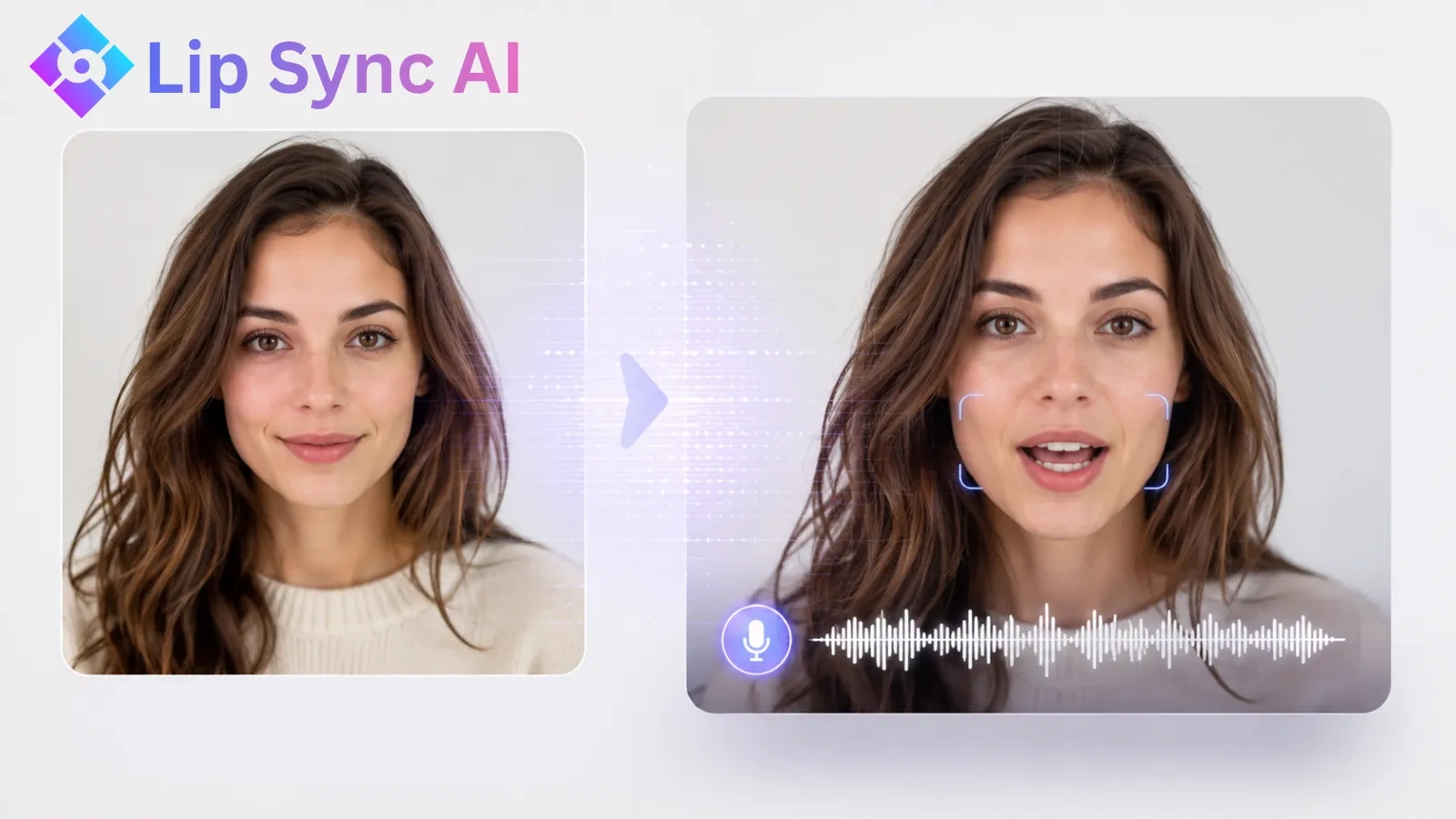
Making a photo talk means using AI to animate a static image so that the person (or character, or animal) in it appears to speak - with matching lip movements synced to your chosen audio or text script. The technology is called talking photo AI, and it runs entirely in your browser.
The appeal is simple: a single photo is all you need to create a talking video in 2026. What once required a camera crew, a recording studio, and hours of video editing can now be done in a browser tab in about a minute. Whether you want to bring a family portrait to life, create a virtual presenter for your brand, or make a pet photo sing happy birthday, AI has made it remarkably simple.
This guide shows you exactly how to make a photo talk with AI, step by step, plus practical tips for crisp, natural-looking output and creative ideas for what to make first. You can follow along with the talking photo AI free trial on Lip Sync AI - no account needed for your first test.
Why Make a Photo Talk? Popular Use Cases
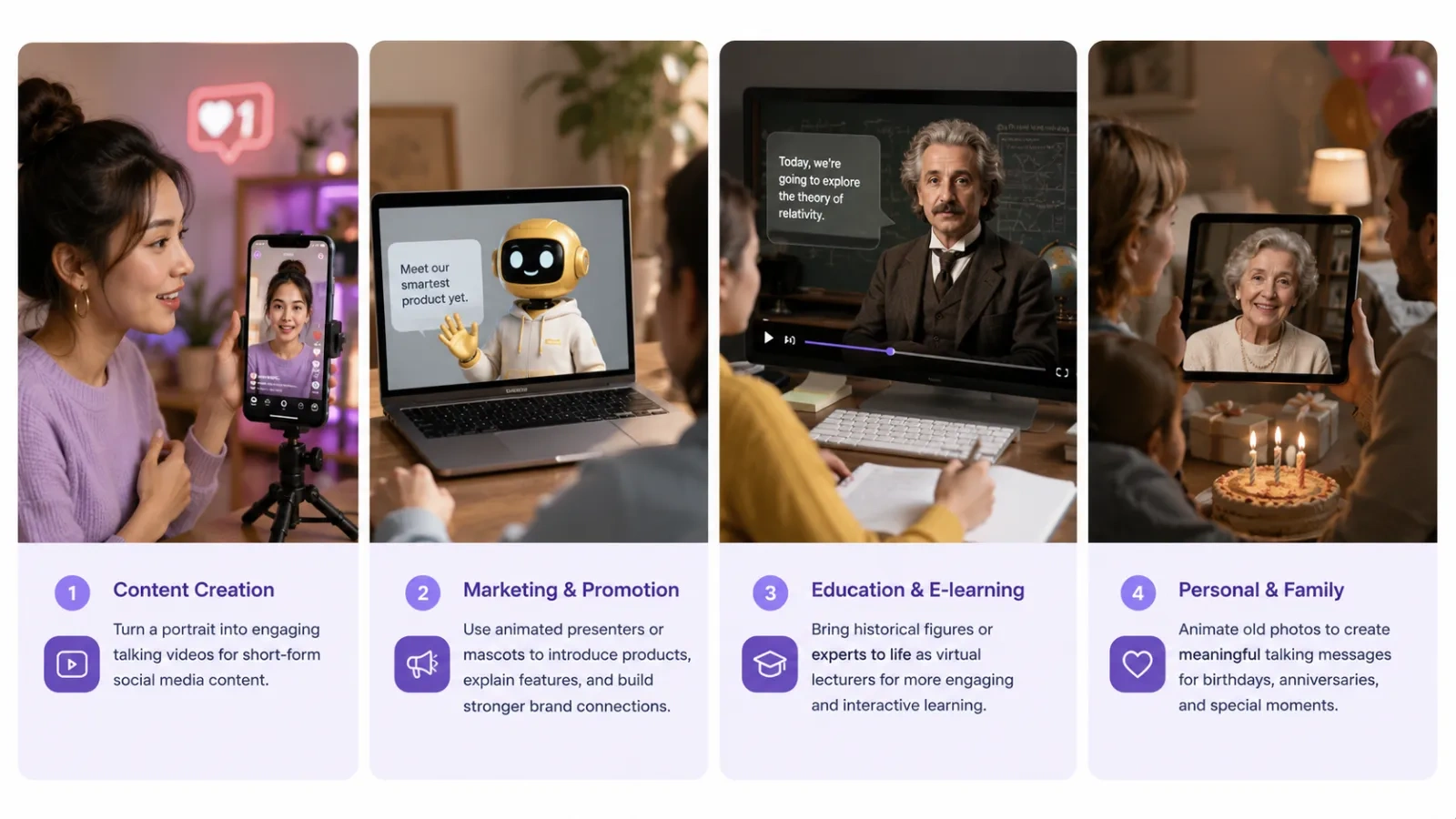
People use talking photo AI for four main things: social media content, marketing and ads, education and training, and personal/family creativity. Each use case has slightly different needs in terms of quality, language support, and budget.
Before diving into the how-to, it helps to know what people are actually using this technology for. The use cases span far beyond novelty entertainment:
- Social media content. Talking photos stop the scroll. Creators turn old photos, memes, and fan art into short speaking clips for TikTok, Instagram Reels, and YouTube Shorts - often with a catchy voiceover or song.
- Marketing and advertising. Brands animate product mascots, bring testimonial photos to life, or create virtual presenters for ads without booking a studio. A talking photo video can be produced in minutes and iterated cheaply.
- Education and training. Teachers and course creators turn historical portraits into "guest lecturers," make textbook diagrams talk, or build onboarding videos for new employees.
- Family and personal projects. The most popular category of all: bringing old family photos to life for birthdays and anniversaries, making a friend's photo deliver a joke at a party, or creating a personalized greeting card.
How Talking Photo AI Works
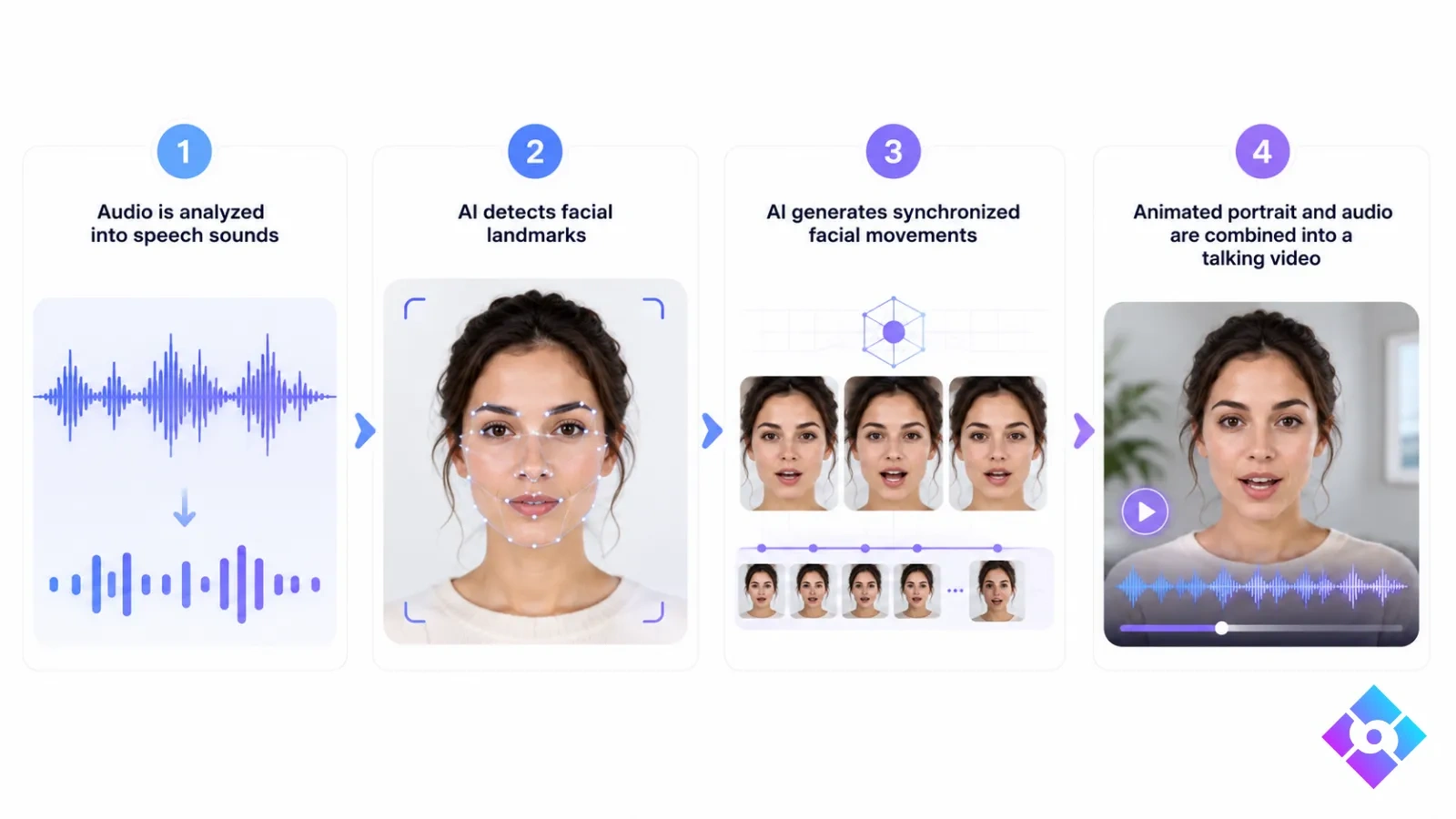
Talking photo AI works through a process called phoneme mapping: the software breaks your audio into individual speech sounds (phonemes), then animates the photo's mouth and face to match each sound, frame by frame. You don't need to understand any of this to use it - the tool handles the entire pipeline automatically.
Here is the basic flow:
- Audio analysis. The AI extracts the speech from your audio file - or converts your text script to speech using a text-to-speech engine.
- Face detection. It identifies the key facial landmarks in your photo: the eyes, nose, mouth shape, and jawline.
- Frame generation. For every frame of the video, the AI generates the mouth and facial positions that correspond to the phoneme being spoken at that moment.
- Rendering. The animated frames are stitched together with your audio and rendered into a downloadable video file.
The entire process runs on cloud servers, which is why you don't need a powerful computer - just a browser and an internet connection. The math is straightforward: the longer the audio and the higher the model quality, the more processing is required, which is why tools price their output per second of video.
How to Make a Photo Talk with AI: Step-by-Step
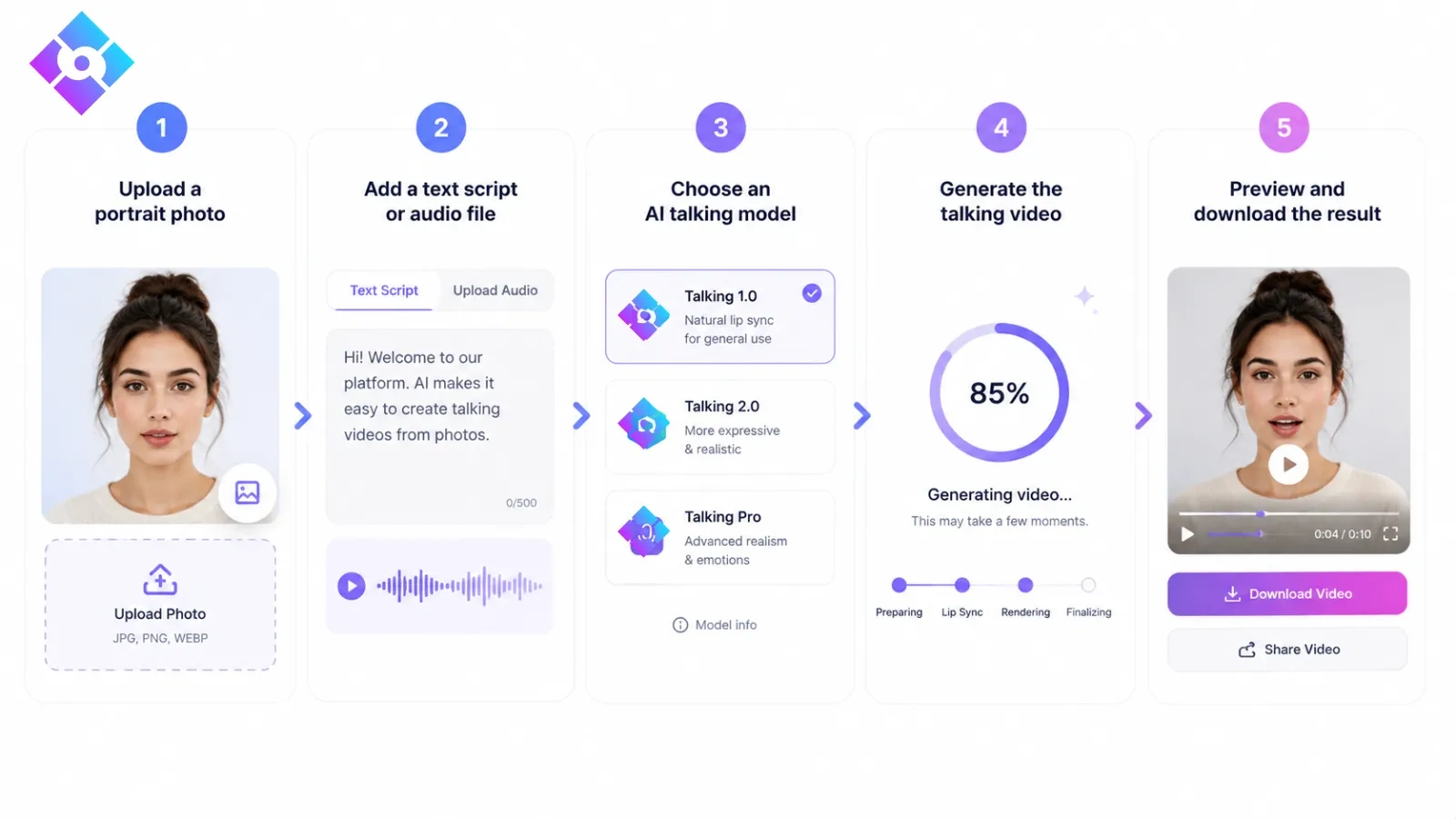
The complete workflow is: upload a photo → add a script or audio → choose a model → generate → download. On Lip Sync AI, the first three steps are free and the Talking 1.0 model requires no account at all.
Here is the complete process using Lip Sync AI's Talking Photo tool. The workflow is similar across most platforms, but the specifics below refer to Lip Sync AI.
Step 1: Choose a clear, front-facing photo
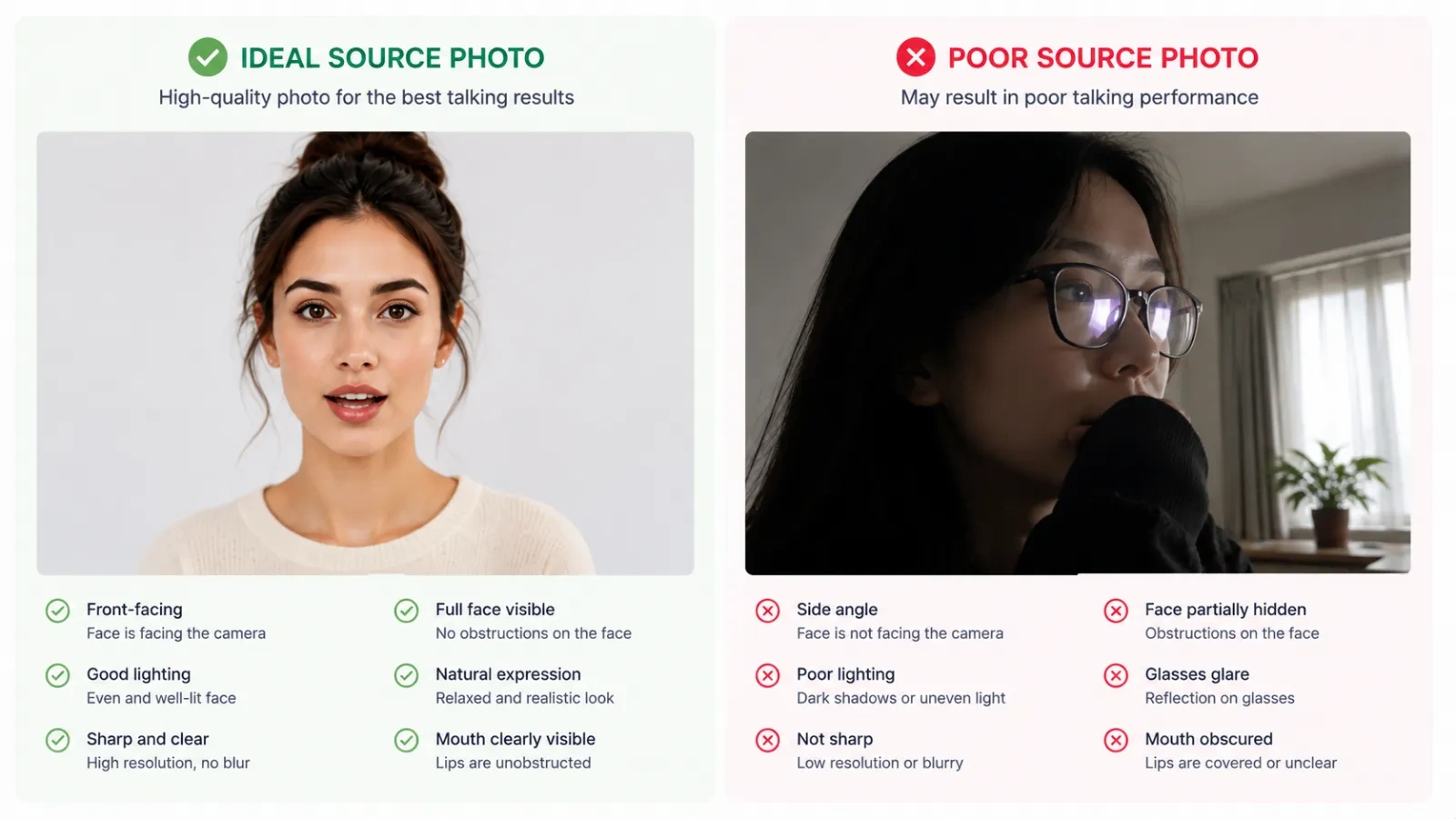
The quality of your result depends heavily on the source image. Use a photo where the face is:
- Large enough to fill a good portion of the frame
- Looking at or near the camera
- Evenly lit, without heavy shadows across the face
- Free of glasses glare, masks, or objects covering the mouth
Supported formats on Lip Sync AI include JPG and PNG, with files up to 50MB.
Step 2: Add your script or upload audio
You have two options:
- Type a script and let the built-in text-to-speech read it (supports 40+ languages)
- Upload an audio file of your own voice or a voiceover, in MP3, WAV, or M4A format
For your first test, type a short 1-2 sentence script. It's faster and lets you preview the flow before you invest in recording audio.
Step 3: Pick a model that fits your quality and budget
This is where costs are decided. Lip Sync AI's Talking models consume credits per second of generated video:
| Model | Cost | Best For |
|---|---|---|
| Talking 1.0 | 1 credit/sec | Quick tests, social clips - the platform's talking photo AI free entry point, no login required |
| Talking 2.0 | 3 credits/sec | Standard social content at a reasonable cost |
| Talking 3.0 | 5 credits/sec | Marketing videos and presentations where quality matters |
| Talking 4.0 | 8 credits/sec | The most lifelike facial performance on the platform |
To make the cost difference concrete: a 30-second Talking 2.0 video uses 90 credits, while the same 30-second video on Talking 1.0 uses 30 credits. You pay for quality only when you need it.
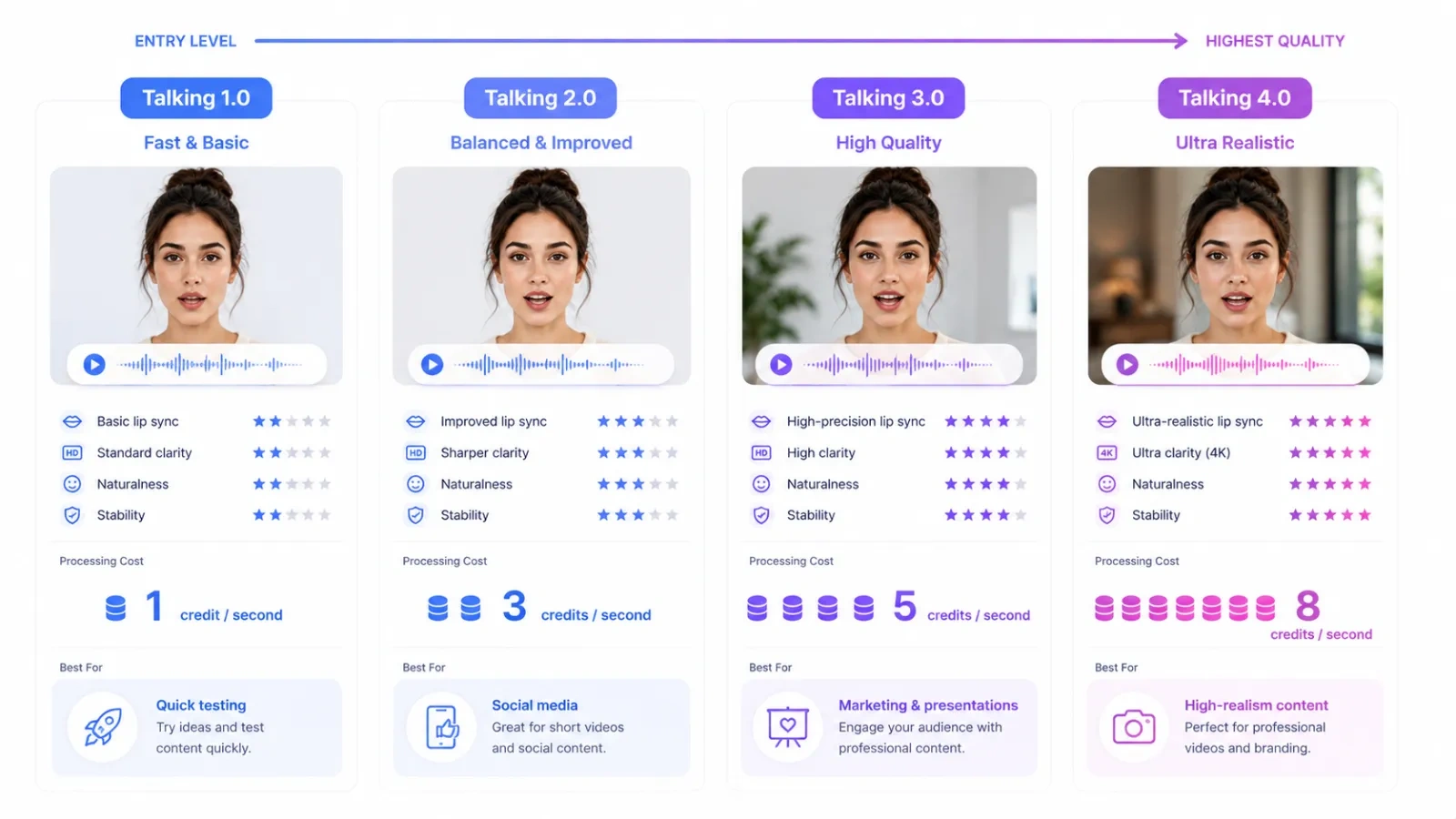
Talking 1.0 is free to try without even logging in - ideal for your first test. Talking 2.0 is the sweet spot for social content. Talking 3.0 and 4.0 deliver the realism you would want for client-facing marketing videos or presentations, with Talking 4.0 producing the most lifelike facial performance on the platform (unlock the advanced models with a free account).
Step 4: Generate
Click generate. The AI takes it from here - analyzing your audio, mapping phonemes to facial movements, and rendering the animation on cloud servers. Most short videos finish within a few minutes, so you will not be waiting long.
Step 5: Download and share
Preview the result, regenerate if needed, then export. Downloads on Lip Sync AI are watermark-free, so they are ready for social media, presentations, or client deliverables. Export to TikTok, Instagram, YouTube Shorts, your LMS, or the family group chat.
Which Talking Photo Tool Should You Use? A Scenario Guide
Choose your tool based on your scenario: on a tight budget or making social content → Lip Sync AI; enterprise API needs → D-ID; premium multilingual marketing → HeyGen; expressive character performance → Hedra; template-based quick videos → Vidnoz; fully free local software → LivePortrait. Prices below are vendor-published entry points verified August 2026 and can change.
| Tool | Free Tier | Paid Entry (verified) | Watermark-Free From | Best Scenario |
|---|---|---|---|---|
| Lip Sync AI | Talking 1.0 trial, no sign-up | Starter $4.99/mo (promo, 155 credits) | Included with paid plans | Budget-friendly social content, cost-conscious creators |
| D-ID | 14-day trial (3 min) | Lite $4.70/mo (personal use, watermarked) | Pro $16/mo | Enterprise avatars, developers, API-heavy workflows |
| HeyGen | 1-3 watermarked videos/mo | Creator $29/mo (600 credits) | Creator $29/mo | Premium multilingual marketing, video translation |
| Hedra | Free tier with watermark | Basic $15/mo (1,500 credits) | Basic $15/mo | Singing, acting, emotional character performance |
| Vidnoz | Daily free credits (720p, watermarked) | Starter - $26.99/month (Billed annually at $19.99/month) | Paid plans | Template-based social shorts for beginners |
| LivePortrait | Free (open source) | Free | Free | Technical users who want full control locally |
How to decide - pick the scenario that sounds most like you:
- "I just want to try it once, no commitment." → Pick whichever free option is easiest to access. Lip Sync AI's Talking 1.0 requires no email at all; Vidnoz and HeyGen hand out recurring free quotas; D-ID gives a 14-day trial. Choose the one whose interface you like.
- "I make social content regularly on a small budget." → Lip Sync AI is a strong option: the talking photo AI free tier (Talking 1.0) works without creating an account, and the tiered model system (1.0 through 4.0) lets you pay only for the quality you actually need.
- "I need an API and enterprise-grade reliability." → D-ID pioneered talking photos and its API is battle-tested, which is why developers and large teams gravitate to it. Note that its Lite plan is personal-use with watermarks; commercial, watermark-free use starts at $16/mo.
- "I run multilingual marketing campaigns with a real budget." → HeyGen is well suited for this, with 175+ languages and strong avatar realism. Its $29/mo entry price and credit-heavy consumption make it expensive for casual use - reserve it for high-value campaigns.
- "I want characters that sing or act, not just talk." → Hedra is a good match for expressive performance, supporting 140+ languages. It costs more per clip than Lip Sync AI, so it suits hero content better than high-volume output.
- "I want to start with templates and minimal effort." → Vidnoz offers a generous free tier and a large template library. Output tends to look more template-driven than model-based platforms, which is fine for quick, high-volume shorts.
- "I'm technical and want free, fully local software." → LivePortrait is open source and runs on your own machine, but expect setup time and a GPU requirement - no cloud rendering, no convenience.
- "I want to test ideas cheaply and upgrade quality only when a concept earns it." → Lip Sync AI's per-second model pricing is designed for exactly this workflow: start on Talking 1.0, move up to Talking 2.0 or 3.0 once a video proves worth the investment.
The practical takeaway: for a one-off novelty video, a free tier will usually do the job. For regular content creation on a budget, Lip Sync AI's model-based pricing is a strong fit. If you need enterprise-scale API integration, choose D-ID; if your priority is high-end multilingual marketing videos with a healthy budget, HeyGen is a well-established choice to evaluate first.
Tips for the Best Talking Photo Results
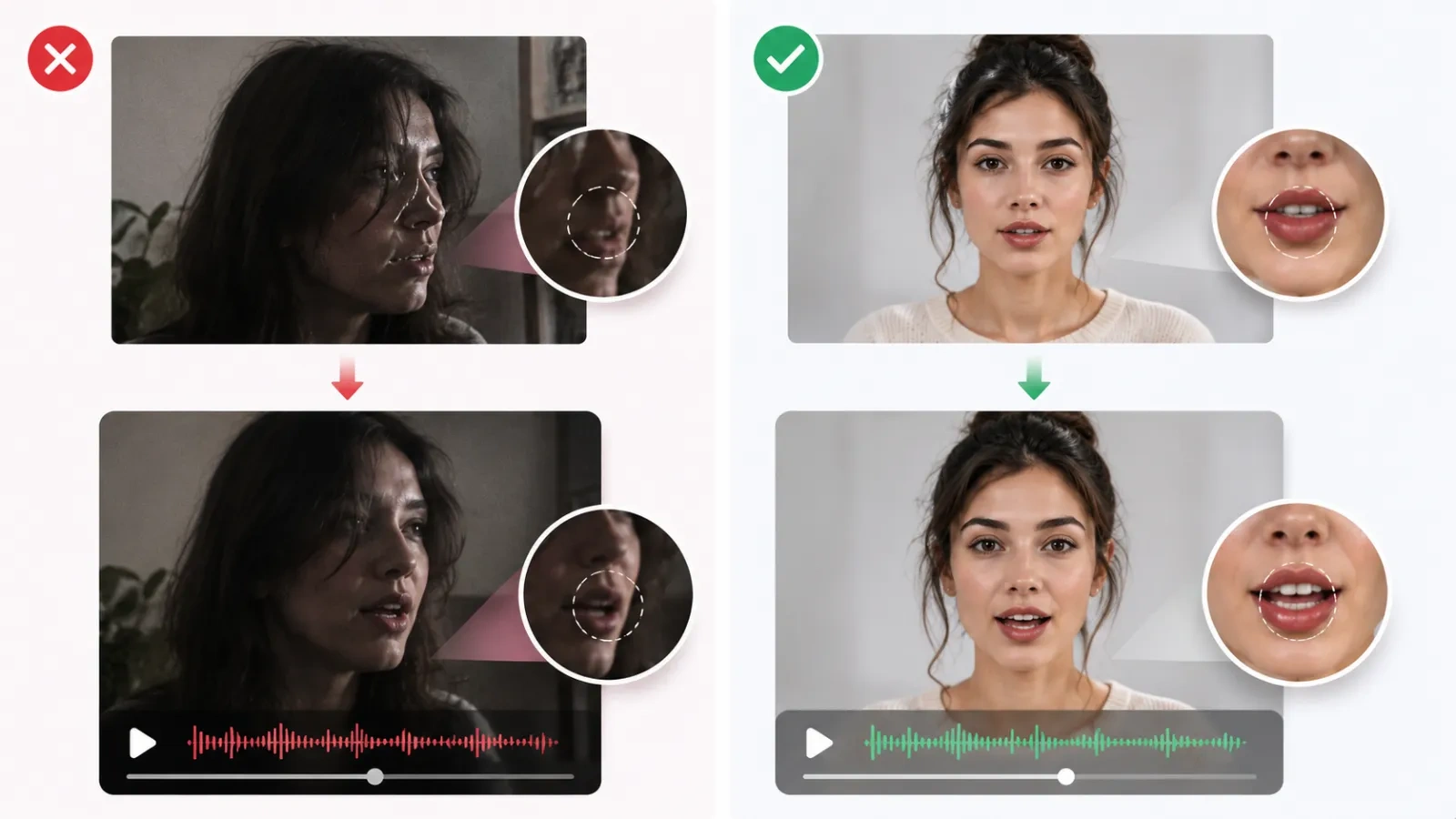
Small tweaks to the source photo or audio almost always improve the output more than repeated generations with the same inputs. When you land a version you like, export and share it - to TikTok, Instagram, YouTube Shorts, your LMS, or the family group chat.
- Use a high-resolution, front-facing photo. The sharper the face, the cleaner the lip sync. Group photos with small faces, extreme angles, or heavy shadows produce worse results.
- Keep scripts short for your first tests. A 15-30 second script is enough to judge quality - and it keeps credit costs low while you experiment.
- Match the audio language to the speaker. If the photo is of a person speaking English, an English script will look more natural than a mismatched language.
- Pause between sentences. Natural pacing - not a rushed wall of text - gives the AI cleaner phoneme segments to work with.
- Check expressions and lighting in the source. Photos where the mouth is clearly visible and the lighting is even animate far better than low-light or mouth-obscured shots.
- Use the right model for the job. Reserve high-cost models (Talking 3.0 and 4.0) for client-facing work, and use budget models for drafts and internal tests - you can always regenerate a winning concept at higher quality.
An ethical note: always get consent before animating a real person's photo, disclose AI-generated content where required (platforms like YouTube now label synthetic media), and never use talking photo tools to mislead, impersonate, or spread misinformation. Most tools' terms of service prohibit misuse, and responsible use protects everyone - including the creators.
FAQ: People Also Ask About Making Photos Talk
Can I make a photo talk for free?
Yes. On Lip Sync AI, you can try the Talking 1.0 model once for free without creating an account - no email required. It's a genuine talking photo AI free experience: upload a photo, add a script, generate, and download a watermark-free test video. To generate more videos and unlock the higher-quality Talking models (2.0 through 4.0), register for a free account. Paid plans add credits and priority processing if you need higher volume.
How much does it cost to make a photo talk?
On Lip Sync AI, the Starter plan costs $26.99/month, or $19.99/month when billed annually. It includes 155 credits. Models consume 1-8 credits per second, so the amount of talking video you can create depends on the model you choose.
How much video can $4.99 generate? With 155 monthly credits, Lip Sync AI's Starter plan can generate approximately 155 seconds (2 minutes 35 seconds) of Talking 1.0, 52 seconds of Talking 2.0, 31 seconds of Talking 3.0, or 19 seconds of Talking 4.0. For comparison, a 30-second clip costs 30 credits on Talking 1.0, 90 credits on Talking 2.0, 150 credits on Talking 3.0, and 240 credits on Talking 4.0.
How long does it take to make a photo talk?
Expect most clips to be ready within a few minutes. Uploading a photo and entering a script takes about a minute of your time; the AI rendering itself typically finishes in a few minutes for short videos, depending on model and server load.
Which talking photo AI should I choose?
Match the tool to your scenario. For budget-friendly social content, Lip Sync AI is a strong option starting at $4.99/mo. For enterprise API needs, D-ID is well established. For premium multilingual marketing, HeyGen is well suited. For expressive character performance, consider Hedra; for template-based quick videos, Vidnoz; for fully free local software, LivePortrait.
Do I need to install software to make a photo talk?
No. All mainstream talking photo tools - Lip Sync AI, D-ID, HeyGen, Hedra, and Vidnoz - run in your browser. You only need an internet connection; no GPU, no downloads, and no special hardware. (The exception is open-source options like LivePortrait, which run locally and do require setup and a GPU.)
Is making a photo talk the same as a deepfake?
Not the same thing. Talking photo AI animates a single static image's mouth and facial movements to match provided audio - a controllable, transparently used creative tool. Deepfakes typically swap one person's face onto another person's body or speech without consent, for deceptive purposes. The line is drawn by consent and intent: using your own photo or a consenting person's photo for creative content is standard practice; creating deceptive content of real people without permission is not.
Can I use talking photo videos commercially?
Yes, depending on your subscription plan. Generated videos can be used for marketing campaigns, social media, presentations, ads, and training materials. Downloads on Lip Sync AI are watermark-free, so they are ready for professional use. Just ensure you have the rights to the photos and voices you use, and check each platform's license terms - some "free" tiers restrict commercial use or apply watermarks.
What do I need to make a photo talk?
Two things: a clear front-facing photo (JPG or PNG on Lip Sync AI, up to 50MB) and either a typed script or an audio file (MP3, WAV, or M4A). That's the entire requirement - the AI handles everything else in the browser.
Can I make a photo talk on my phone?
Yes. Talking photo tools are web-based, so they work in any mobile browser. Upload a photo from your camera roll, type or record your script, and download the finished video - the same workflow as on desktop. Some platforms also offer mobile-optimized interfaces or apps.
How many languages does Lip Sync AI support?
Lip Sync AI supports 40+ languages, making it suitable for creating talking photo videos for a wide range of global audiences. That covers the languages most content creators need for international social content, marketing, and education. If you need a specific niche language, check the platform's current language list before committing to a workflow.
Final Thoughts
Making a photo talk is one of the fastest-growing AI content formats of 2026 - and one of the easiest to start. You need a photo, a script, and a few minutes; the tools handle the rest. Start with a free test on Talking 1.0, match your tool to your actual scenario, and scale up quality only when a video earns it.
Ready to try it? Upload your first photo to Lip Sync AI's Talking Photo tool - the talking photo AI free trial needs no account, so you can see a photo talk in about a minute.
Sources
- Lip Sync AI - Talking Photo AI product features and model documentation
- Lip Sync AI - Pricing plans and credit packages
- Lip Sync AI - AI lip sync video generation platform
- D-ID - Pricing and plans
- HeyGen - Pricing and free plan details
- Hedra - Platform and pricing
- Vidnoz - Pricing and free credits
- LivePortrait - Open-source project (GitHub)
- AppCritica - Best Digen AI Alternatives for Talking Photos and AI Avatar Videos (2026)
Pricing and feature details verified against official sources as of August 2026. Plans and credit structures change frequently - confirm current numbers before purchasing.