
Quick Recap
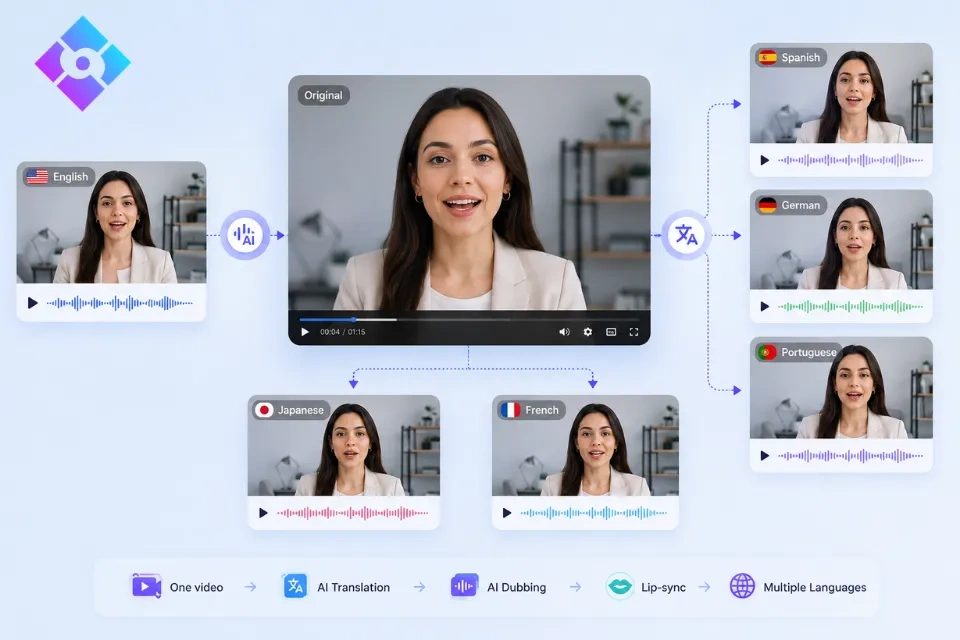
Quick recap: AI video translation turns an existing spoken video into a new language version by combining transcription, translation, AI dubbing, and lip synchronization. Use Lip Sync AI when the speaker is visible and the translated audio needs to look connected to the face, not merely play over the original mouth movement. Lock the source transcript first, translate for spoken timing, test a short sample, and require a fluent reviewer to approve meaning, pronunciation, and on-screen text before publishing.
- Choose subtitles when reading is acceptable and the original performance should remain untouched.
- Choose standard dubbing when listening matters but the speaker's mouth is small or off-screen.
- Choose lip-synced AI dubbing for close-up presenters, interviews, lessons, announcements, and support content.
- Treat every language as a separate deliverable: a clean result in one language does not prove quality in another.
What Does the Data Say About Multilingual Content?
Multilingual audio can contribute meaningful viewing time rather than serving as a cosmetic add-on. In September 2025, the YouTube Official Blog reported that creators using multi-language audio received, on average, more than 25% of their watch time from views in the video's non-primary language. The same announcement said multi-language audio amplified views on Jamie Oliver's channel by 3x, while Mark Rober averaged more than 30 language dubs per video.
Language also affects buying confidence beyond video platforms. A 2020 CSA Research survey covered 8,709 consumers in 29 countries. It found that 76% preferred products with information in their own language, 40% would not buy from websites in other languages, and 75% were more likely to buy from the same brand again when customer care was available in their language.
These figures do not guarantee that every translated video will gain views or sales. They do show why language deserves its own distribution strategy. The practical question is not "How many languages can you generate?" It is "Which language version can you publish with enough accuracy and supporting local content to be useful?"
Subtitles, Dubbing, or Lip-Synced Dubbing?
Select the output before translating the script. Each format solves a different viewing problem.
| Format | What the viewer receives | Best fit | Main limitation |
|---|---|---|---|
| Translated subtitles | Original voice plus translated text | Fast localization, accessibility, interviews where the original voice matters | The viewer must read while watching |
| AI dubbing | Translated spoken audio over the original video | Screen recordings, narration, wide shots, and audio-first content | Visible mouth movement may not match the new speech |
| Lip-synced AI dubbing | Translated audio plus adjusted mouth movement | Close-up speakers, training, support, and presenter-led content | Requires stronger source footage and visual QA |
| Hybrid version | Dubbed audio plus translated captions | Broad distribution and comprehension in noisy settings | More text, audio, and timing assets to maintain |
Lip-synced dubbing is not automatically the premium choice for every scene. If a tutorial shows a screen for most of its runtime, conventional AI dubbing may be sufficient. If the face dominates the frame, Lip Sync AI Dubbing can reduce the visible mismatch between the original mouth movement and the translated track.
What Does an AI Video Translator Actually Change?
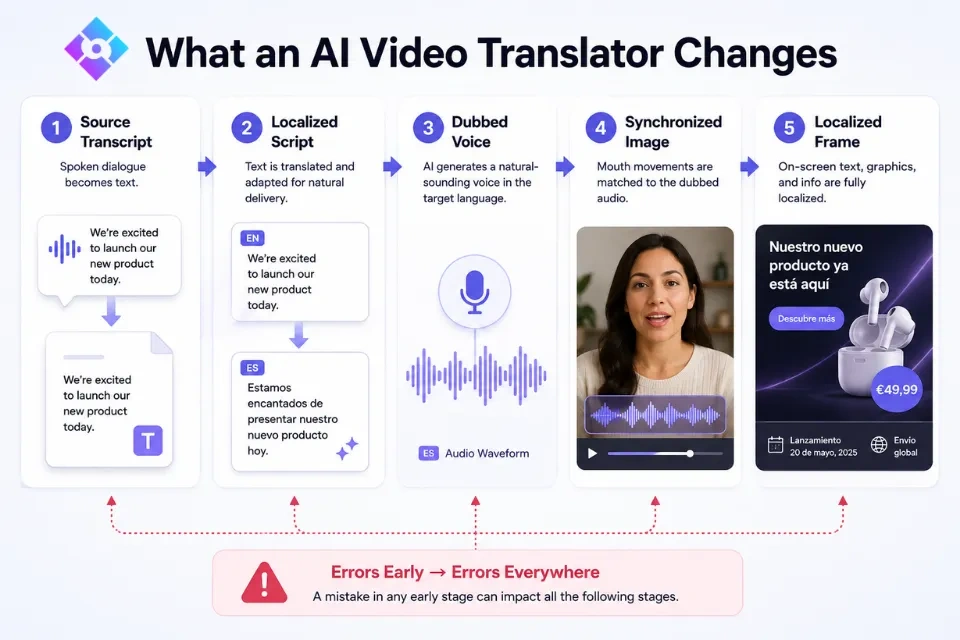
AI video translation is a chain of five dependent assets. An error at the beginning can travel through the entire chain.
- Source transcript: the exact words, speaker labels, timestamps, names, and numbers in the original recording.
- Localized script: a target-language adaptation written to be spoken, not a literal text replacement.
- Dubbed voice: the translated performance, including pronunciation, pace, pauses, and emphasis.
- Synchronized image: mouth movement aligned to the new audio where the speaker is visible.
- Localized frame: captions, lower thirds, screenshots, prices, units, dates, and disclaimers that match the spoken version.
Lip Sync AI automates key parts of the speech and synchronization stages, but automation does not remove ownership. Assign one approved file to each layer and use version names such as video-topic_es-MX_v03_reviewed. That small discipline prevents an old script or unapproved audio track from returning during export.
Build a Translation-Ready Source Before Uploading
Separate Facts From Flexible Language
Mark names, model numbers, prices, measurements, legal wording, and safety instructions as locked facts. Place slogans, examples, humor, and idioms in a flexible group that a local reviewer may adapt. This keeps a translator from "improving" information that must stay exact.
Create a Pronunciation and Terminology Sheet
List every brand name, acronym, technical term, and word that should remain untranslated. Add the preferred target-language term and a simple pronunciation note. Lip Sync AI can generate a fluent voice, but it cannot infer an unpublished brand pronunciation or internal glossary rule.
Clean the Dialogue Track
Music, room echo, and overlapping voices can make transcription and dubbing less dependable. Use the Lip Sync AI Audio Cleaner when noise masks speech, or the Audio Enhancer when the recording needs more clarity. Keep an untouched master so the original mix is always recoverable.
Mark Visual Risk Zones
Note timestamps where the face turns away, a hand covers the mouth, two people speak together, or a cut occurs mid-word. These are not automatic failures, but they deserve extra attention after Lip Sync AI renders the localized version.
How to Translate a Video With AI: A Six-Stage Localization Workflow
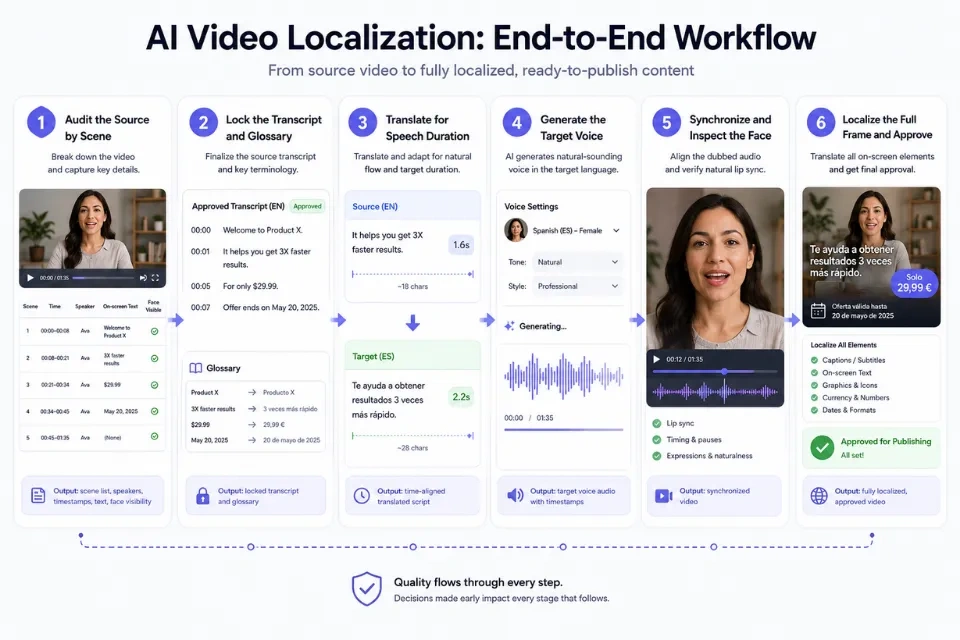
Stage 1: Audit the Source by Scene
Watch the entire video and divide it into logical segments. Record the speaker, start and end time, visible text, required facts, and whether the mouth is clearly visible. This scene map becomes the control document for every language.
Do not begin with a long batch. Select a 20- to 40-second sample containing a close-up, a proper name, a number, and at least one complete pause. It gives Lip Sync AI enough variety to expose translation, voice, and synchronization problems early.
Stage 2: Lock the Transcript and Glossary
Correct speech-recognition errors before translation. Confirm every name, date, product term, price, URL, and call to action against the source of truth. If two speakers talk in the same scene, label each line so the correct voice and face can be checked later.
Stage 3: Translate for Speech Duration
Translate meaning first, then edit for delivery. A target-language sentence may be much longer than the original even when both are accurate. Replace unnecessary repetition, move context into captions when appropriate, and protect required facts.
Read the translated line aloud at a natural pace. If it only fits when rushed, revise it before generating audio. This timing pass is more reliable than trying to repair an overloaded sentence after Lip Sync AI has produced the dub.
Stage 4: Generate the Target Voice
Open the AI Dubbing tool, upload the approved sample, and choose an available target language. Lip Sync AI's Dubbing 1.0 is presented as a fast-turnaround model with basic voice cloning; the product page currently lists a maximum duration of 40 seconds, 480p output, and a cost of 2 credits per second for that model.
Listen without watching first. Check pronunciation, tone, speed, pauses, numbers, and sentence endings. If the audio alone fails, changing the mouth movement will not rescue the version.
Stage 5: Synchronize and Inspect the Face
Generate the lip-synced version in Lip Sync AI, then watch it once at normal speed and once around risk zones. Concentrate on close-ups, fast consonants, head turns, sentence endings, and scene cuts. A result can feel natural overall while still containing one distracting moment that needs a shorter line or cleaner source shot.
Stage 6: Localize the Full Frame and Approve
Update captions, titles, lower thirds, diagrams, dates, currencies, measurements, URLs, and policy text. The spoken translation and visible text must use the same terminology. Have a fluent reviewer approve the final render, not just the script, because timing and audio generation can introduce new issues after translation.
Use a Pass-or-Fail QA Scorecard
Replace vague feedback such as "sounds a little off" with a repeatable check. A simple scorecard makes decisions more consistent across languages and reviewers.
| QA area | Pass condition | Reject when |
|---|---|---|
| Meaning | Intent and required facts match the source | A claim, instruction, number, or relationship changes |
| Local language | Wording sounds natural for the target audience | Translation is literal, awkward, or regionally inappropriate |
| Pronunciation | Names and key terms follow the glossary | A brand, person, place, or technical term is mispronounced |
| Voice | Pace, tone, and emphasis fit the scene | Speech is rushed, flat, clipped, or inconsistent |
| Lip sync | Mouth movement feels connected at normal speed | Drift is obvious during close-ups or sentence endings |
| Full frame | Captions and graphics match the dubbed script | Visible text conflicts with the audio or remains untranslated |
| Rights and policy | Voice, likeness, and claims are approved | Consent, disclosure, or regulated wording is missing |
Require all critical rows to pass. Do not average a serious meaning error against strong visual quality. Lip Sync AI output should only move to distribution after the language owner and content owner agree on the same final file.
Roll Out Languages Based on Evidence
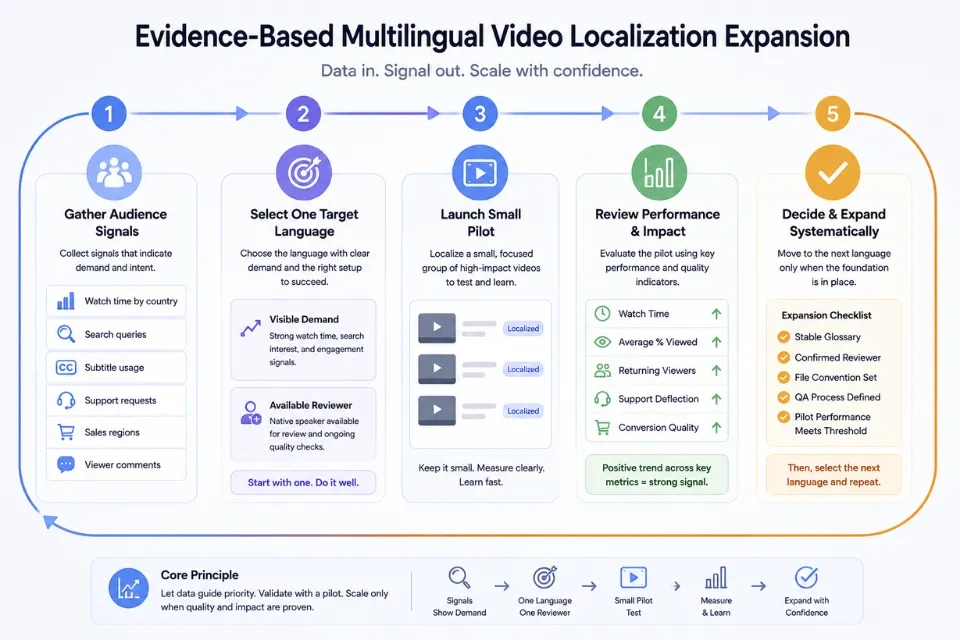
Start with audience signals rather than a long language list. Review watch time by country, subtitle usage, search queries, support tickets, sales regions, and comments requesting a translation. Choose one language with both visible demand and an available reviewer.
Publish a small group of representative videos, then compare non-primary-language watch time, average percentage viewed, returning viewers, support deflection, and conversion quality. YouTube's reported 25%+ non-primary-language watch-time average is useful context, not a universal benchmark. Your baseline, topic, channel size, and distribution determine what counts as progress.
When the first language has a stable glossary, reviewer, file convention, and QA pass rate, add the next. Lip Sync AI can shorten generation work, while the documented process keeps every new version from becoming a separate improvisation.
Common Failure Patterns and Targeted Fixes
- The translation is accurate but too long: remove redundancy, split the sentence at a natural pause, or move supporting detail into captions.
- The voice says a name incorrectly: add a phonetic spelling to the glossary and regenerate only the affected segment.
- The mouth looks wrong near a cut: move the cut to a pause, shorten the translated line, or use a reaction shot over the transition.
- One speaker receives another speaker's line: add speaker labels and separate overlapping dialogue before using Lip Sync AI.
- Music competes with the dubbed voice: return to separate audio stems and rebuild the mix around the new speech.
- Captions disagree with the dub: generate both from the same approved localized script, then run a final frame-level check.
- Reviewers keep reversing each other's edits: name one language owner and keep a decision log for disputed terminology.
What AI Video Translation Cannot Approve for You
AI can produce fluent speech without knowing that an idiom is inappropriate, a warranty statement is outdated, or a technical instruction has changed meaning. Humor, dialect, regulated claims, medical or legal information, and safety content need qualified human review.
Voice and face generation also require permission. Do not use Lip Sync AI to clone a voice, alter a person's performance, or imply a translated endorsement without clear authorization. Keep records of consent and approved scripts for any public-facing spokesperson.
Finally, lip sync is not a substitute for localization. A synchronized mouth cannot correct an untranslated interface, the wrong currency, an unavailable offer, or customer support that does not serve the target language. The entire viewer journey should support the promise made by the video.
Frequently Asked Questions
What is AI video translation?
AI video translation converts spoken video into another language through transcription, translation, and generated speech. A complete localized version may also include lip synchronization, translated captions, replacement graphics, and market-specific terms.
How does an AI video translator work?
An AI video translator creates a source transcript, converts it into the target language, generates a new voice track, and combines that audio with the video. Lip Sync AI also adjusts visible mouth movement so the translated speech and face feel connected.
How do you translate a video with AI?
Map the source by scene, verify the transcript, build a terminology sheet, translate for spoken timing, generate a sample in an AI dubbing tool, and run language, audio, visual, and full-frame reviews. Scale only after the sample passes all checks.
Can AI translate video and lip sync it at the same time?
Yes. Lip Sync AI can combine translation, AI dubbing, and visual synchronization in one workflow. Results still depend on source audio, face visibility, sentence length, language, and review quality, so each exported language version needs separate approval.
Is AI video dubbing the same as AI dubbing?
The terms overlap, but AI dubbing focuses on replacing speech with a generated target-language track. AI video dubbing includes the surrounding video tasks, such as scene timing, captions, audio mixing, and optional lip synchronization.
Final Thoughts
AI video translation works best as a controlled localization system, not a one-click export. Separate the transcript, localized script, voice, synchronized image, and on-screen text; give each asset an owner; and reject any version that changes meaning even when it looks polished.
Start with one short sample and one target language. Once the translation, voice, lip sync, frame text, and rights checks pass, reuse the same glossary and scorecard for the next version. Try Lip Sync AI to build a multilingual video in which the translated voice and visible speaker feel like one performance.
Sources
- Lip Sync AI - AI Dubbing
- Lip Sync AI - Pricing Plans & Credit Packages
- Lip Sync AI - AI Video Guides, Tutorials & Tips
- YouTube Official Blog - Unlock a World of Viewers With Multi-Language Audio
- CSA Research - Consumers Prefer Their Own Language
- Captions - AI Video Dubbing: How It Works, When to Use It and What to Watch For